Sky Vikings!
minecraft.buchanan.oneStatus
Server Status: active
There are 0 of a max of 20 players online:
News
First update!
v1.1.0 released.
Change log:
- Adds simple storage
- Adds farmers delight
- Updates all mods with new versionss
- Removes evil craft
Modpack Download
Download modpack export (.zip)Install Instructions
CurseForge
- Download the modpack
.zipexport above. - Open CurseForge and go to Minecraft.
- Choose Create Custom Profile, then Import.
- Select the downloaded
.zip. - Launch the imported profile.
Modrinth App
- Download the modpack
.zipexport above. - Open the Modrinth App.
- Use Create instance or Import.
- Select the downloaded
.zip. - Launch the imported instance.
Prism Launcher
- Download the modpack
.zipexport above. - Open Prism Launcher.
- Choose Add Instance, then Import.
- Select the downloaded
.zip. - Launch the imported instance.
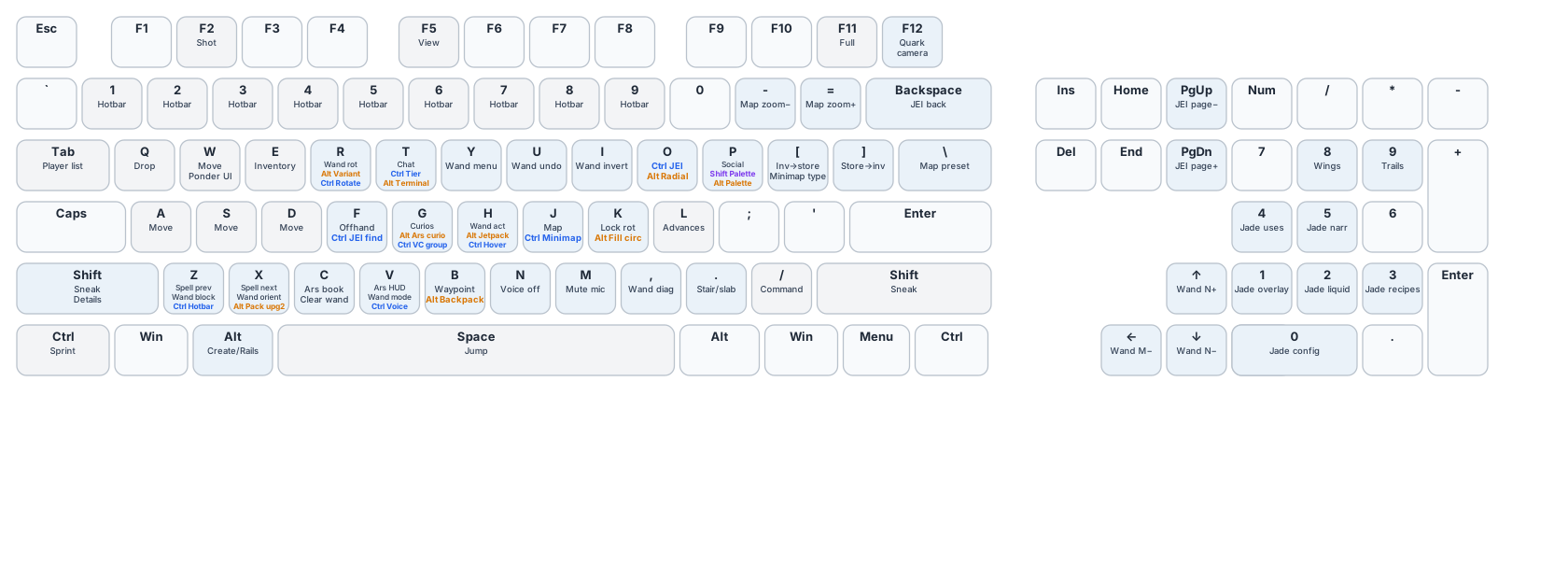
Keymap